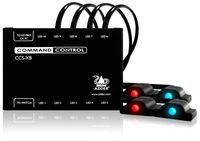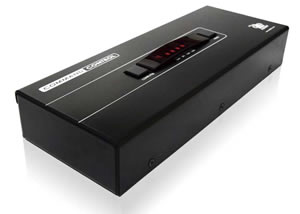

Adder Command & Control Switch, 4 Port, USB
CCS4USB-US
The Adder CCS4USB Command & Control Switch is a professional grade control switch delivering USB True Emulation for use with modern or custom USB peripherals and audio, with RS232 control.
The CCS4USB delivers USB2.0, bi-directional audio and True Emulation technology. CCS4USB is video independent (so can be used alongside DVI, VGA, Display Port etc). The CCS4USB allows you to work across all 4 computers and screens as though they were a single interface. Adder's True Emulation technology enables USB HID devices to be continuously emulated to each computer. This technology enables instantaneous and reliable hotkey switching while also supporting the extra keys and features of enhanced keyboards and mice. Furthermore, the CCS4USB includes two independently switchable USB 2.0 Hi Speed channels and an audio channel, giving the user the flexibility to attach selected peripherals to different computers.

ADDER CCS4-USB Command and Control Switch Back View
The Adder Free-Flow represents true innovation in KVM switching. Free-Flow allows users to automatically switch between target computers simply by moving the mouse pointer from screen to screen. You no longer need software to be installed on your mission critical computers in order to do this. Adder Free-Flow resides on the switch itself, sensing screen boundaries and instantaneously switching keyboard and mouse to the defined target computer. Free-Flow can be configured for almost any combination of screens using the included application which allows you to declare the individual screen sizes and visually position each one relative to the others.
Adder CCS4USB Features:
- True Emulation USB2.0 technology
- Independent simultaneous device selection- Flexibility is key to the CCS4USB. The switch enables you to use the keyboard and mouse on one computer while your USB peripherals are connected to other computers and your speakers are playing audio from yet another. You can of course still switch all the connected devices to any one of the connected computers.
- Channel selection options- The CCS4USB can be switched using selectable keyboard hotkeys, 3 button mice or the front panel controls. Optionally, you can also use the RC4 remote switch to make your selection. These switching options allow you to rapidly reassign connected devices to any of the connected computers.
- Broad USB 2.0 Hi Speed device support- A vast range of USB devices can be connected to the CCS4USB. From non standard human interface devices to printers and scanners. This gives great flexibility. For example, you could be scanning a set of documents onto one computer while working on another and printing from yet another, all at the same time. The USB 2.0 switching action has been carefully engineered to ensure maximum computer reliability when connecting and disconnecting USB devices.
- Synchrony Software switching- Using Adder's Synchrony software, you can switch channels automatically simply by moving your mouse cursor across the edge of the screen. This means you can seamlessly run you pointer across all 4 connected computers, switching either all ports or just keyboard & mouse as you go.
- Options port for control and upgrade- An 'Options' port enables the CCS4USB to be remotely switched using simple ASCII codes. The port enables a 4 button switch unit (RC4) to be used with the CCS4USB. The same port can also be used to upgrade the firmware to guarantee that your hardware investment continues to deliver real value well into the future.

Adder Command & Control Switch Application Diagram
Adder CCS4USB Specifications:
| Mechanical | |
| Height | 2 in. (40 mm.) |
| Width | 9 in. (230 mm.) |
| Depth | 3 in. (85 mm.) |
| Environmental | |
| Operating temperature | 0°C to 40°C / 32°F to 104°F |
| Power | |
| Power | 2.5mm DC jack (power adapter included) |
| Input to power adapter | 100-240VAC 50/60Hz |
| Output from power adapter | 5VDC 2.5A |
| Compatibility | |
| Hardware compatibility | All computers with USB interfaces |
| Software compatibility | Operates with all known software and operating systems including Windows (all), DOS, Linux, Unix, BSD, all Sun OS, all Mac OS, NetWare etc. |
| Computer Connections at Switch | USB2.0 type B, 3.5mm stereo jack |
| Local KVM Console Connection | |
| Keyboard/Mouse | 2 x USB type A |
| Switched USB | 2 x USB2.0 type A |
| Audio | 3.5mm stereo jack |
| Other Connections | Options (flash upgrade, sync with an other CCS4USB and RS232 triggered power switches): Modular 10P10C |
| Approvals | CE, FCC |
Answer: Thank you for your inquiry. This unit does not require a network connection to operate. the Network port you see in the image is actually an Options port for either adding the optional remote control or for connecting to a computer to make firmware upgrades using the included flash upgrade cable.
Question: Can you tell me how may VSC40 cables are supplied with the "standard" four (4) port Adder purchase?
Answer: Thank you for your inquiry. The Unit will ship with one VSC40 flash up grade cable.
Question: can you tell me how to get the drivers for this device
Answer: Firmware updates for the ADDER CCS4USB and FreeFlow software can be located here: http://www.adder.com/firmware-updates.
Question: The diagram shows one monitor per PC. Can the PC(s) connected use multiple monitors?
Answer: Thank you for your inquiry. Yes, the latest version of the Adder Free-Flow firmware does support multi-monitor computers (available on Windows operating systems only).
It does require the installation of the appropriate driver. From the manual, "In order to use Multi-Monitor mode you will need to install a Multi-Monitor Free-Flow driver (available for download from the Adder website www.adder.com/products/adder-freeflow#downloads onto each PC that has multiple monitors attached."
Question: Can Hot Keys be programmed into this switch that can be directed to Only a certain PC Port?
Answer: Thank you for your inquiry. Unfortunately, the only programing of the hot keys is to change the default [CTRL] + [ALT] combo in case it conflicts with other software.
Question: Does this product come with ANY cables, or do all cables have to be purchased separately?
Answer: Thank you for your inquiry. The CCS4-USB will ship with the following:
1 x Flash upgrade cable: VSC40
1 x Power adapter with coutnry speciifc power cord
4 x Self-adhesive feet
Additional cables needed would include the USB and audio cable for each attached CPU.
Question: We have already purchased this device and it is in use and operating very well. Does the software for it come on a separate disk/CD/DVD? Or is everything needed to operate the device already installed in its firmware and therefore no disk/CD/DVD, etc. needed?
Answer: Thank you for your inquiry. You are correct, this is a hardware based solution that generally does not require the installation of additional software on target machines for basic use.
The Free-Flow technology (which requires firmware version 2.00), however, does require additional software to configure the monitor setup (this need not be on a target PC, but must be Windows based). Also, the multi-monitor mode of Free-Flow requires a driver to operate correctly. Both the driver and configuration utility can be downloaded from the adder website: http://www.adder.com/products/adder-freeflow#downloads.
For more details, see the CCS4USB manual located here: http://www.adder.com/sites/default/files/pdf/manuals/Adder%20CCS4-USB%20v2-9h.pdf
Question: Can I mix OS? As in, use it across 1 PC and 3 MACS?
Answer: Thank you for your inquiry. Yes, for the most part the CCS4USB is operating system independent and will allow for the mixing and matching of operating systems (as long as they meet the minimum requirements). The driver for dual-head targets using Multi-Monitor Free-Flow and the Free-Flow configuration and firmware upgrade programs are Windows only.
More details can be found in the manual located here: http://www.42u.com/pdf/Adder-CCS4-USB-v2-9h.pdf.
Question: So I have a question.. We are struggling with our current setup.. 4 small computers connected to our KVM IOGEAR and iogear connects to usb extender that then leads to another usb extender using cat5 into our conference room less than 33ft away.. then plugs into our wiresless keyboard and mouse
Answer: Thank you for your inquiry. Unfortunately, due to the complex and varied nature of user environments, detailed product support is beyond the scope of this simple FAQ. Having said that, here are a couple areas to consider.
In general, support for Wireless keyboards and mice can be spotty. This is related to the very different way in which wireless devices communicate. This issue can be particularly tricky when the KVM uses certain forms of keyboard and mouse emulation. You might try a basic, wired keyboard and mouse to see if that resolves the problems. Here is a statement by IOGear on wireless keyboards and mice: http://iogear.custhelp.com/app/answers/detail/a_id/1071/kw/wireless%20keyboard.
Another issue may be related to the extension units. Depending on how the USB signal is handled, the USB extenders might be introducing errors. A "transparent" extension should not be a problem, but if the USB data is substantially transformed to accomplish the extension, that may lead to the same type of errors as wireless communications. Try the wireless devices directly attached to the KVM unit, and to each extender separately.
There may also be an issue if the USB signals are combined. Some KVM devices expect an independent signal from both a keyboard and mouse. if the USB extension is a single port device, the signals may not be interpreted correctly by the KVM.
Another consideration mentioned in the IOGear KVM FAQ section relates to self-powered KVMs: 'My self-powered KVM occasionally freezes, what can I do to fix this?
The chipsets on some computer models may not transfer enough power over the PS/2 and USB port to completely power the KVM. Intermittent mouse and keyboard functionality is often a sign of an underpowered KVM.' - http://iogear.custhelp.com/app/answers/detail/a_id/2420. Adding additional USB extension may compound this issue.
Question: Is it possible connect my 2 PCs installed close each other on only one printer, using this switch and USB cables?
Answer: Thank you for your inquiry,
Yes sir, the Adder CCS4USB-US supports printer / USB device sharing using the included USB Hub ports. However, the CCS4USB-US was just discontinued within the week - The direct replacement for that switch is the Adder CCS-PRO4-US which also supports printer switching.